Amalgam Audio • Big Hairy Guitars • Core Tone Captures • Drums And Tones • Gitarrenlehreronline • Jason Sadites • Juca Nery • Live Ready Sound • Mad Steex • Massimo Varini • Matt Fig • PassionForTone • Signal Theory • The Studio Rats • The Tone Shepherd • Tone Factor • Tone Junkie TV • Tone Wars • XOG
After registering TONEX Board and installing the software, connect the Board by USB-C, launch TONEX
Board Editor, and install the latest firmware before continuing. The latest firmware is required for
the best experience.
Quick start - Register, update, and start playing
Download and install the IK Multimedia Product Manager
Use IK Product Manager to register your hardware and install the TONEX software suite.
Open IK Product Manager and log in with your IK Multimedia credentials.
Register your TONEX Board
Enter the serial number supplied with your TONEX Board.
Download and install TONEX software
Install/update the TONEX software suite and authorize it. During the installation ensure that TONEX Board
Editor is selected. You will use Board Editor to update the firmware before continuing.
Update TONEX Board firmware
Connect TONEX Board to your computer via USB-C and launch TONEX Board Editor. The application will
automatically detect if an update is available. If an update is available, follow the on-screen
instructions to install the latest firmware. Keep power and USB connected until the update is complete.
Connect your instrument and output
Plug your guitar or bass into Input 1, then connect XLR Out 1–2, Output 3–4, or headphones.
Open the tuner
- In any mode: Press footswitches B + C together to open the tuner.
- In Preset Mode: You can also press and hold the footswitch for the active preset. To exit the tuner and
return to playing, press any footswitch.
Load a preset and start playing
Press the Browse knob to open the Preset Browser, rotate to preview a preset, and press to load it.
TONEX Board Editor
Installed with the TONEX software suite, TONEX Board Editor is the required tool for firmware
updates. After updating, use it to transfer Tone Models, presets, and custom IRs from your computer
and to back up the Board setlists.
Restore Purchases
If TONEX Board Editor still doesn't let you see your TONEX Board after installing and authorizing the
TONEX software, try to follow these steps:
Open the TONEX app
TONEX 2: Open the account menu (bottom left corner)
TONEX 1: Open the settings menu (top right corner) and navigate to account
Press Restore Purchases
After your purchases are restored the TONEX Board Editor should correctly see the connected TONEX
Board.
The TONEX 2.0.4 Player Public Beta is available to all TONEX users. As a registered TONEX Board user, you unlock the complete Board signal chain and effects in TONEX software, where you can create, play, and organize complete rigs—or record with them using the TONEX plug-in in your DAW.
The beta installer includes TONEX 2.0 Player, TONEX Modeler, TONEX Editor (for older TONEX hardware), and TONEX Board Editor.
Select Past & Beta Releases, then download and install version 2.0.4.
Open IK Product Manager and confirm that TONEX is Authorized.
Installing the beta replaces your current TONEX applications, so back up your TONEX library first.
DIAL IN YOUR SETUP - Configure the Board for your rig
Traditional Amp
1. Connect. Run an analog output from TONEX Board to the amp input or effects-loop return.
2. Bypass cabinets if needed. If you are using TONEX Board together with a real guitar/bass cabinet, we suggest bypassing any cabinet in your TONEX Board preset. To do so: Open Settings → Global → General and enable Global Cabinet bypass.
FRFR / PA / monitors
1. Connect. Use XLR Out 1–2 or Outputs 3–4.
2. Keep cabinets on. If there is not a real guitar/bass cabinet running after TONEX Board, we suggest using a Tone Model with its cabinet, VIR cabinet, or custom IR enabled.
USB audio recording coming October 1, 2026
Beginning October 1: Install the latest TONEX Board firmware through TONEX Board Editor, then connect the Board to your computer by USB-C.
In your DAW: Select TONEX Board as the audio input and output, create a track, choose the desired Board input, arm the track, and record.
Headphones
1. Connect. Plug headphones into the mini-TRS headphone output.
2. Set volume. Start low, play, and raise the Volume knob to a comfortable level.
Level Check
1. Open the Audio Panel. Tap the Settings gear in the upper-right, then select Audio Panel.
2. Check the input. Play your instrument at normal performance level and watch the meter for the input you are using.
3. Set the input level. Adjust that input until the signal is strong but does not clip.
4. Set the output level. Play again and adjust the active output for your amp, PA, monitors, headphones, or recording setup.
OPERATING MODES - Choose what the footswitches do
TONEX Board footswitches can operate in three different modes:
Preset Mode: to operate using presets.
Scene Mode: to operate with scenes within a preset.
Stomp Mode: to activate/bypass any slot assigned to a footswitch.
Preset Mode
Select: Tap the mode icon until Preset is shown.
Use: Press A, B, or C to load a preset. To browse banks, make sure Footswitch is set to Release under Settings > Global > General. Then press A + B together for the previous bank, or C + CTRL together for the next bank.
Scene Mode
Select: Press the CTRL footswitch or tap the mode icon to cycle through the available modes until Scene Mode is shown.
Use: Press A, B, or C to recall a scene. Assign a parameter: Press EDIT, press and hold the parameter, then select Scene Mode.
Stomp Mode
To use TONEX Board in Stomp Mode:
Assign a slot: Press EDIT, press and hold the slot, select Assign, then press A, B, or C.
Use: Select Stomp Mode, then press the assigned footswitch to enable or bypass the slot.
Shortcut: Press CTRL when it is assigned to Mode Cycling, or tap the mode icon in the upper-left of the display.
BOARD CONTROLS - Move confidently between views
TONEX Board has three different views:
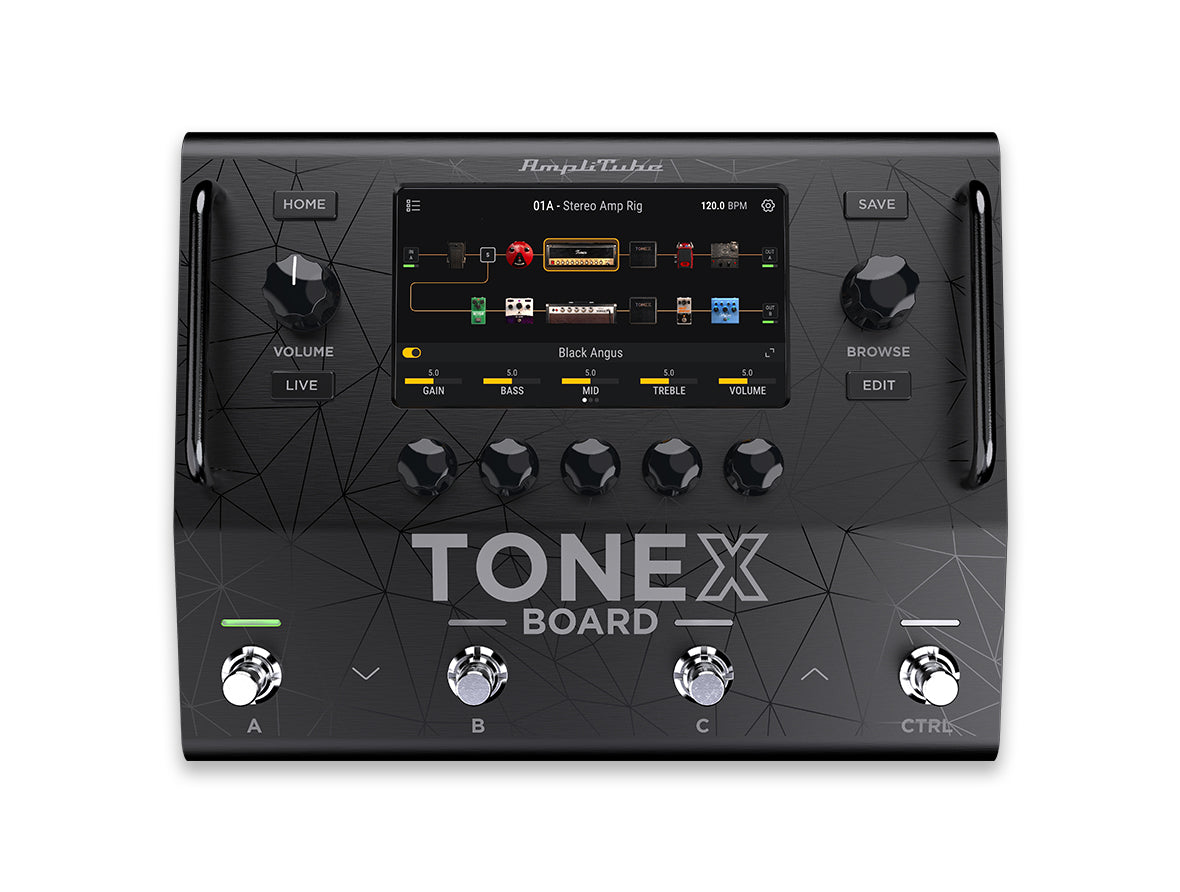
Home View lets you access the main information of the selected preset.
Edit View lets you edit the selected preset chain.
Live View displays the most useful information when playing live.
Home View
Open: Press HOME.
Use: Rotate the Browse knob to select presets. Use the five parameter knobs to adjust the assigned Quick Parameters.
Edit View
Open: Press EDIT.
Use: Touch a slot, input, or output to edit the rig; swipe or rotate Browse knob to choose gear. Touch the selected slot or an empty slot on chain to open the gear browser.
Live View
Open: Press LIVE.
Use: Check each footswitch assignment and adjust Quick Parameters while performing.
BUILD YOUR RIG - Shape the chain and route your signal
To show the selected preset chain, press the EDIT button to display the EDIT VIEW.
Choose a chain layout
Serial: Place up to 12 slots in series.
Split / Mix: Press and hold a slot on Path A, then add a Split and/or Mix block to use Path B for parallel processing.
Independent paths: Press and hold the input and output modules to add a second input and output. Assign each path its own input and output to create two independent six-slot signal chains.
2. Assign: Choose XLR Out 1, XLR Out 2, XLR Out 1-2, Output 3, Output 4, Output 3-4, All (1-2 and 3-4). You can also use Send 1, Send 2 or Send 1-2 as additional outputs.
Add a Quick Parameter
1. Select: Select the gear containing the parameter.
2. Assign: Press and hold the parameter, then select Quick Parameter.
3. Use: Return to Home or Live View to adjust it.
Once you've finished editing the selected presets, press SAVE to save them.
PERFORMANCE SETUP - External control and output EQ
To show the selected preset chain, press the EDIT button to display the EDIT VIEW.
External controls
TONEX Board can be controlled with up to 2 external control pedals.
Connect an external pedal to EXT. CTRL 1 or 2, then configure it from the Board:
• Open Settings → Global → External Control, then select EXT. CTRL 1 or EXT. CTRL 2.
• Choose Single Switch, Double Switch, or Expression Pedal and set its function. For an expression pedal, select CALIBRATE and follow the on-screen range prompts.
To create a macro, press EDIT, press and hold a parameter, select the external control, then set the parameter’s minimum and maximum values.
GLOBAL EQ
Tailor each output for its destination.
You can tweak both XLR Output 1-2 and Output 3-4 with a global EQ. To set the global EQ for an output:
1. Open Global EQ. Tap the Settings gear in the upper-right, then select Global EQ.
2. Choose an output pair. Select XLR Out 1–2 or Output 3–4.
3. Adjust the EQ. Set the available EQ controls while listening through the selected destination.
4. Set the other output if needed. Switch to the other output pair and create a separate EQ setting.
Global EQ settings are independent for XLR Out 1–2 and Output 3–4, so you can optimize each connection separately.